Checked 7 October 2026
How to export a CSV from ANZ
A CSV is a plain spreadsheet of your transactions. Budget apps, spreadsheets and accountants can all read it. Here's how to get one from ANZ Internet Banking (anz.co.nz), on a desktop browser.
Walked through step by step in real ANZ internet banking.
Steps
- Your accounts, then the account you want. You land on its Transactions tab.
- Above the transaction list, click Export (the down-arrow icon next to Filter and Print).
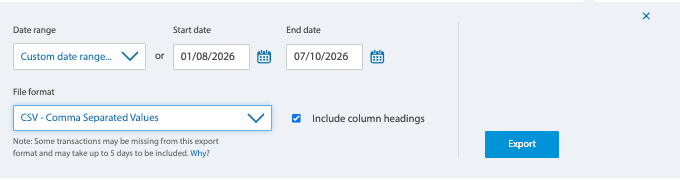
- Set the Start date and End date. The last two or three months is a good first import.
- Change File format from PDF Document to CSV - Comma Separated Values.
- Leave "Include column headings" ticked, then click Export. The file saves to your Downloads.
Worth knowing
- ANZ's own note: some transactions can be missing from an export for up to 5 days. If the newest days look thin, export again in a few days; anything already here is skipped as a duplicate.
Then drop it into KeaBudget
KeaBudget reads ANZ's columns for you, sorts each shop into a category, and skips anything you've already imported. Free, made in New Zealand.
Start using KeaBudget →Another bank? ASB. More banks are added as they're checked.